If you’re running more than a couple of smart devices—or worse, a home lab—your home network is already more exposed than you think. The biggest mistake people make is assuming that if it works, it must be secure.
It usually isn’t.
Consumer networking gear is designed for convenience, not hostile environments. The internet is hostile.
The Port Forwarding Trap
Yes, you can open ports on your router and forward them to:
- NAS management pages
- Home automation dashboards
- Media servers
- Cameras
- Game servers
- Admin interfaces
And yes, everything will work.
But now every one of those devices is directly exposed to the internet.
That means:
- Every device needs its own patching schedule
- Every device must withstand brute-force attacks
- Every device must log and rate-limit properly
Most consumer-grade devices:
- Don’t rate-limit well
- Don’t log in a useful way
- Don’t support modern authentication
- Aren’t built to defend themselves long-term
You’re asking dozens of small embedded systems to behave like hardened servers. That’s not realistic.
One Door In, Not Twenty
A secure home network follows one simple rule:
External traffic should hit exactly one system. Everything else stays internal.
There are two common ways to do this at home:
- Cloud-based tunnels
- A local reverse proxy
Both are valid. They just trade control for convenience.
Option 1: Cloudflare Tunnels (Simple and Safe)
Cloudflare tunnels work by creating an outbound-only connection from your home network to Cloudflare’s edge.
What this means:
- No inbound ports opened on your router
- Traffic hits Cloudflare first
- Cloudflare forwards approved requests to your services
Pros
- Very hard to misconfigure
- Built-in DDoS protection
- Geo-blocking and authentication options
- Works even without a public IP
Cons
- You’re trusting a third party
- Less visibility into raw traffic
- More abstraction when debugging
- Some self-hosted apps don’t love tunnels
For many households, this is the right solution. It’s clean and low-maintenance.
Option 2: Reverse Proxy (Maximum Control)
This is the route I chose, and it’s where most serious home labs eventually land.
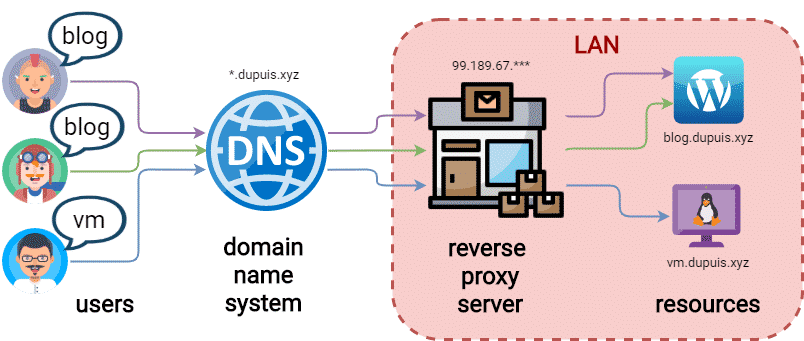
A reverse proxy is a dedicated system that sits at the edge of your network and performs four critical jobs:
- Terminates SSL
- Routes traffic based on hostname
- Filters and logs requests
- Shields internal devices from the internet
Everything external hits one hardened system. Nothing else is directly exposed.
Why a Reverse Proxy Beats Port Forwarding
Instead of this:
Internet → Router → NAS
Internet → Router → Camera
Internet → Router → Home Assistant
You get this:
Internet → Reverse Proxy → Internal Services
The advantages are real:
- Internal devices never see raw internet traffic
- Brute-force attempts die at the edge
- You centralize logging and security rules
- You harden one system, not twenty
This is how enterprise networks work—because it works.
The SSL Wall You Eventually Hit
Early on, I ran a single SSL certificate for:
baumwire.com
That’s fine… until you want to expose multiple services:
pictures.baumwire.com
fun.baumwire.com
home.baumwire.com
plex.baumwire.com
Managing individual certificates for each service quickly becomes:
- Annoying
- Error-prone
- Completely unnecessary
Wildcard Certificates: The Right Answer
A wildcard SSL certificate covers:
*.baumwire.com
That means:
- Any subdomain works automatically
- No per-service certificate installs
- No SSL management on individual devices
The reverse proxy:
- Holds the wildcard certificate
- Handles HTTPS for everything
- Forwards traffic internally (HTTP or HTTPS)
Your NAS doesn’t need to know what SSL is.
Neither does Home Assistant.
Neither do cameras or dashboards.
One certificate. One renewal process. One place to manage it.
The Security Benefit Most People Miss
This setup does not route outside traffic through your internal network.
Traffic:
- Hits the proxy
- Gets validated
- Gets filtered
- Gets logged
- Either forwarded or dropped
Internal services:
- Never see scanners
- Never see malformed requests
- Never see brute-force attempts
That’s not theoretical security. That’s practical risk reduction.
Geo-Blocking: Cheap Wins
Look at your firewall logs sometime.
Most failed login attempts come from:
- Countries you will never legitimately access from
- Known scanning regions
- Bot-heavy networks
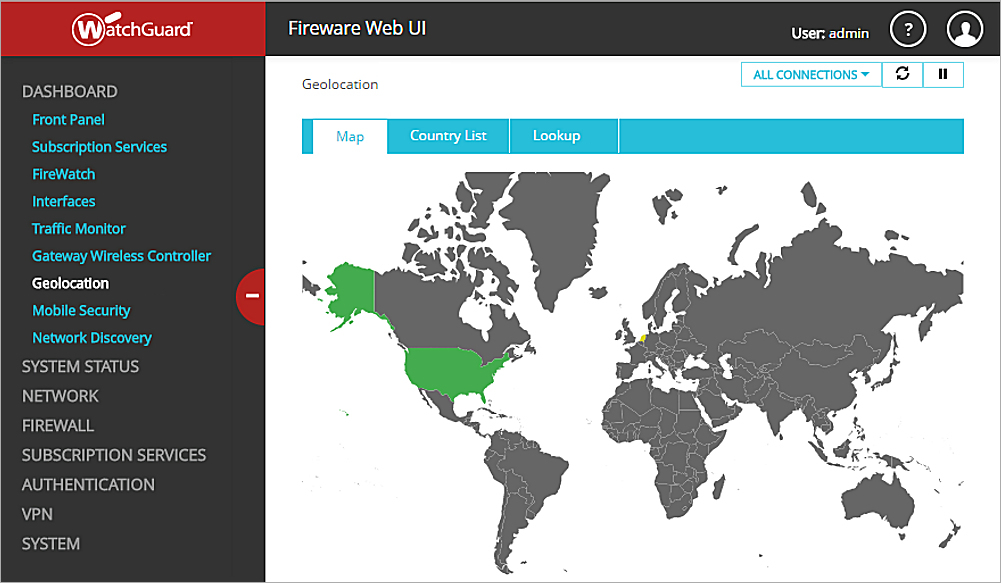
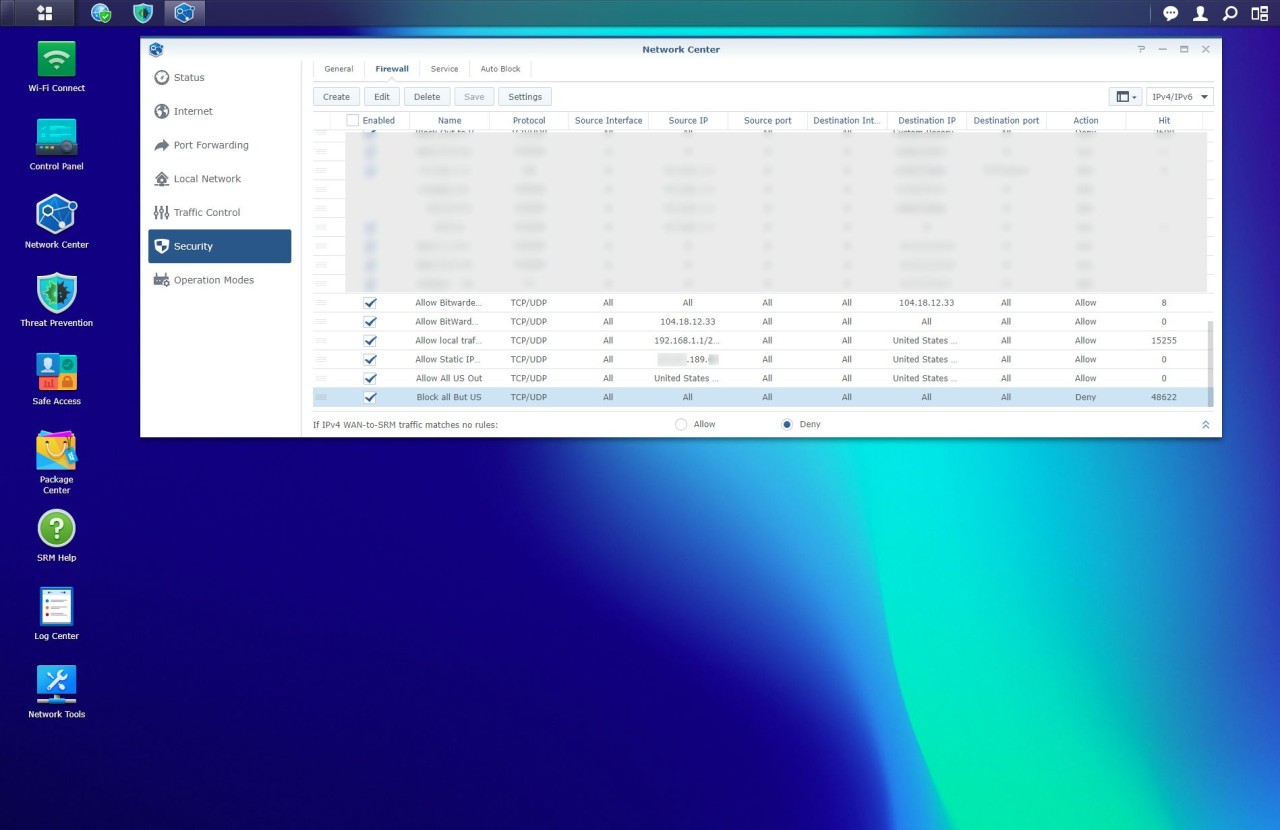
If your router or firewall supports country-based blocking, use it.
This isn’t about being paranoid.
It’s about reducing attack surface by probability.
Blocking regions you don’t need often eliminates a massive amount of noise.
Router-Level Firewall and Threat Detection
At a minimum, your edge device should support:
- Stateful firewall rules
- Some form of IDS/IPS or threat detection
- Logging that’s actually readable
Examples of what this may include:
- Intrusion detection
- Reputation-based blocking
- Automated temporary bans
- Alerting on abnormal behavior
Even basic implementations make a measurable difference.
The Bottom Line
If your home network includes:
- A NAS
- Cameras
- Home automation
- Dashboards
- Self-hosted services
Then direct port forwarding is your weakest link.
Whether you choose:
- A Cloudflare tunnel
- Or a reverse proxy
The goal is the same:
Expose one hardened entry point.
Keep everything else private.
That’s how real networks are secured.
Your home network deserves the same respect.